Reflection: Emerging Technologies Project

Back in December the West Wilts Federation invited each of its schools to bid for money to spend on new technologies. You can read some of the background to this project here and there are descriptions of what each school bid for, and how it worked, on the Wiki here.

Yesterday we attended a conference at Melksham Oak school where everybody shared the successes, learning points and next steps of their individual projects. It was a fantastic session, throughout which I tweeted heavily. There are some really amazing things going on out there and I’m excited to see how it’s going to move forward.

For me, there were three clear messages that came out of what everybody said.

1. Share
Some of the stuff people have done is really cutting edge and exciting, like the 1:1 iPad use at Lavington (I learn from Mark Anderson, currently doing his own exciting iPad project, that there is a dearth of schools doing this). BUT! They’re not TELLING anybody!
Granted, not everybody is as verbose as me and can’t be expected to blog their every move, but better updating of the project Wiki, and more publicising on the school websites, would make this work accessible to a lot of other educators.
I think people don’t share, partly due to time, and partly due to thinking other people might not be interested. However, if we don’t start sharing better, there’s going to be a lot of wheel reinvention coming up.

2. Train
Much was made of staff needing training with these devices. One school produced a digest for staff of ideas and successes to get the word out. Another ran half hour sessions after school to “show and tell” ideas about what could be done.
I think staff need to be made to feel confident using the devices. A lot of the time, the kids will be able to teach you something you didn’t know; but teachers can be reticent in asking pupils for help, in my experience. That’s one hurdle.
A point was also made about increased cynicism amongst staff following misuse of the devices by students in the classroom, leading to a decline in willingness to try them again. I feel this is Mr Darcy syndrome – “Their good opinion, once lost, is lost forever”. Instead of backing off entirely, though, we need to repeat the experiment until the pupils can get it right. Part of new technologies in the classroom for me is about training the pupils to use it appropriately.

3. Resource
Six of the eight schools explained that their existing wireless networks had not been up to the task of supporting the new technologies. This made me wonder whether the project should have started first by addressing the infrastructure of the schools involved and making sure it could support the devices chosen. There’s no doubt these devices could really fly with better connectivity.
On the other hand, though, using the devices without Wifi has, I think, made people a bit more creative. People have found ways to use their new techs without having them connected to the Internet. We bought Mifis along with our kit which allows us to connect outside of school, which we might not have tried if we’d had wifi in school.
So, there are pluses and minuses for this one.

Overall, the project has been really exciting so far. I feel extremely fortunate to have been a part of it and look forward to developing some new bits and pieces in the future. I think my favourite thing (it’s very hard to pick just one) was the use of iPads to collect questionnaire responses on a field trip; these were then collated and graphed before the pupils even arrived back, and ready for analysis in the next lesson. That’s a couple of dull number-crunching lessons saved immediately, and pupils straight on the meaningful work. Love this!

Posted in Emerging Techs | 2 Comments

Reflection: Studying as an Adult

This Friday saw the culmination of two years’ worth of Friday afterschool lessons, as I sat the Geology GCSE exam with another member of staff, Jonty, and about 20 year 10 students. The course was run by Tom, the Head of Geology, and offered to motivated learners from the start of year 9. They had to write a letter to get a place and he was inundated with keenos. Jonty and I decided to join the course too.

It was quite a learning curve for me. The course is meant to build on KS3 Geography and Science curricula; I teach Geography when I have a year 7 class as we do combined Humanities for that year group, but I dropped Geography myself at the end of year 9 and had not had any interest in it; and although I enjoyed Science at school, that was a while ago now. This meant that grasping some of the basics took me a little longer and I was consistently foxed by little things like the wording of questions and how to draw diagrams &c. Fieldwork was particularly difficult.
I also found it difficult to stay on top of the homework. A GCSE in an hour a week is always going to involve quite a lot of homework and, although I managed to find time to put plenty of effort into some pieces (see below) I was embarrassed by the number of blank spaces in my exercise book when it got to revision time.

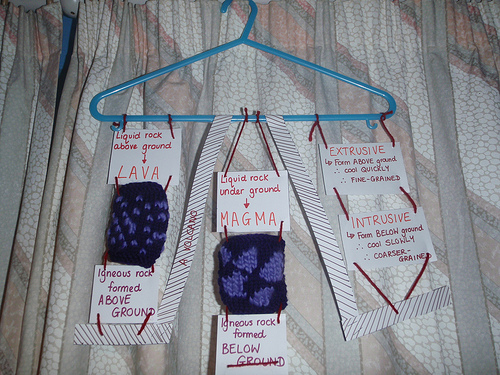
Knitted rocks

Got to get the knitting in somewhere...

(People who know about these things will be able to spot the glaring error I made but rest assured – I fixed it before I handed it in).

In spite of the glitches, the positives of doing the course were huge, and far bigger than I first anticipated.

1. Ongoing observation
In order to ensure I could have cover to take the exam, the course had to appear as a performance management target this year. The target was for me to feed back successful strategies to the Humanities department from ongoing, long-term observation in another faculty. Science has achieved great success at school and so watching a Science teacher regularly, especially a well-respected one like Tom, was very helpful.

2. New ideas
Following on from (1), I got some great tips on laying out my whiteboard (I now use a much smaller font, knowing it to be readable) and some really good ideas for homework. “Research xyz and present your findings in an interesting way” has led to some of the best homeworks I’ve ever seen this year (pinata of Civil War facts, anybody?) and there are also group work activities that I have used successfully in my own classroom after seeing them modelled in Geology.

3. Empathy
I vow never to say in front of a student, “That exam was easy!” because it made me feel like crap! Having misunderstood one of the questions on the paper and written a long and well-crafted but completely incorrect answer to it, I also vow to offer more exemplar answers to my GCSE students before they sit their paper.

4. Higher expectations
The kids on the course were all in the top half of the ability spectrum, but not all AG&T. However, they were all extremely conscientious and motivated. Some dropped out when they realised actual work was involved, but the rest really rose to the challenge and worked their socks off. It taught me that I can have much higher expectations of the majority of my pupils and still not be disappointed.

5. Exam boards need to get it right
WJEC offered this exam online. I got two-thirds of the way through, and my exam crashed. I had to complete on a paper copy, and then go back and fill in the rest of the paper copy just in case, which meant asking for a pencil and a ruler. This affected maybe a quarter of the class, one of whom is entitled to a scribe for written exams, which meant somebody had to run off and pull a TA in at short notice. It was a debacle. I was very annoyed. I’m not sure if they’ll mark all the paper answers or some online, some paper; I wasn’t able to go back and check my online answers.
Luckily, the outcome of this exam is not important to me in the grand scheme of things*. For the year 10s, this is their first GCSE and they have worked hard to make sure they’re successful. I’m appalled WJEC offered an online exam that their systems were clearly not up to supporting: we were not the only school who had problems. I feel that they have been badly let down.

6. Modelling lifelong learning
At first the kids thought it was a bit odd that Jonty and I were always in the lesson. We weren’t very good at following the usual rules: I used my phone quite regularly to look things up. I found it intensely frustrating not to be able to tell the chatty boys to be quiet, but mostly I managed to keep my trap shut. After a while, they got used to us, and I think we both served as good role models for lifelong learning. We got it wrong; he never had a pen; I was stupidly anal about keeping my notes neat; they had to help us at least as much as we had to help them; and, perhaps most importantly, we went the distance. I didn’t think I would manage to stick with it for two years but for a variety of reasons this was not difficult. When we were all hanging around outside after the exam discussing the technical issues, I had to pause for a moment and say, “Wait wait…garnet: crystallisation from a melt, right?” and was greeted by relieved faces and lots of nods**. The solidarity was good for all of us. I think they liked to see I was as nervous and unsure as they were.

I can also add to that fieldwork trips to Durdle Door, Iceland and Vallis Vale but I think there’s quite enough here to convince you it’s a great idea!

Now begins the agonising wait until August….

* I really, really wanted an A*, having missed out first time round, but I don’t think I did enough work to deserve one!

** although actually, I got this wrong!

Posted in wins | 3 Comments

Classroom Kindles: part 5

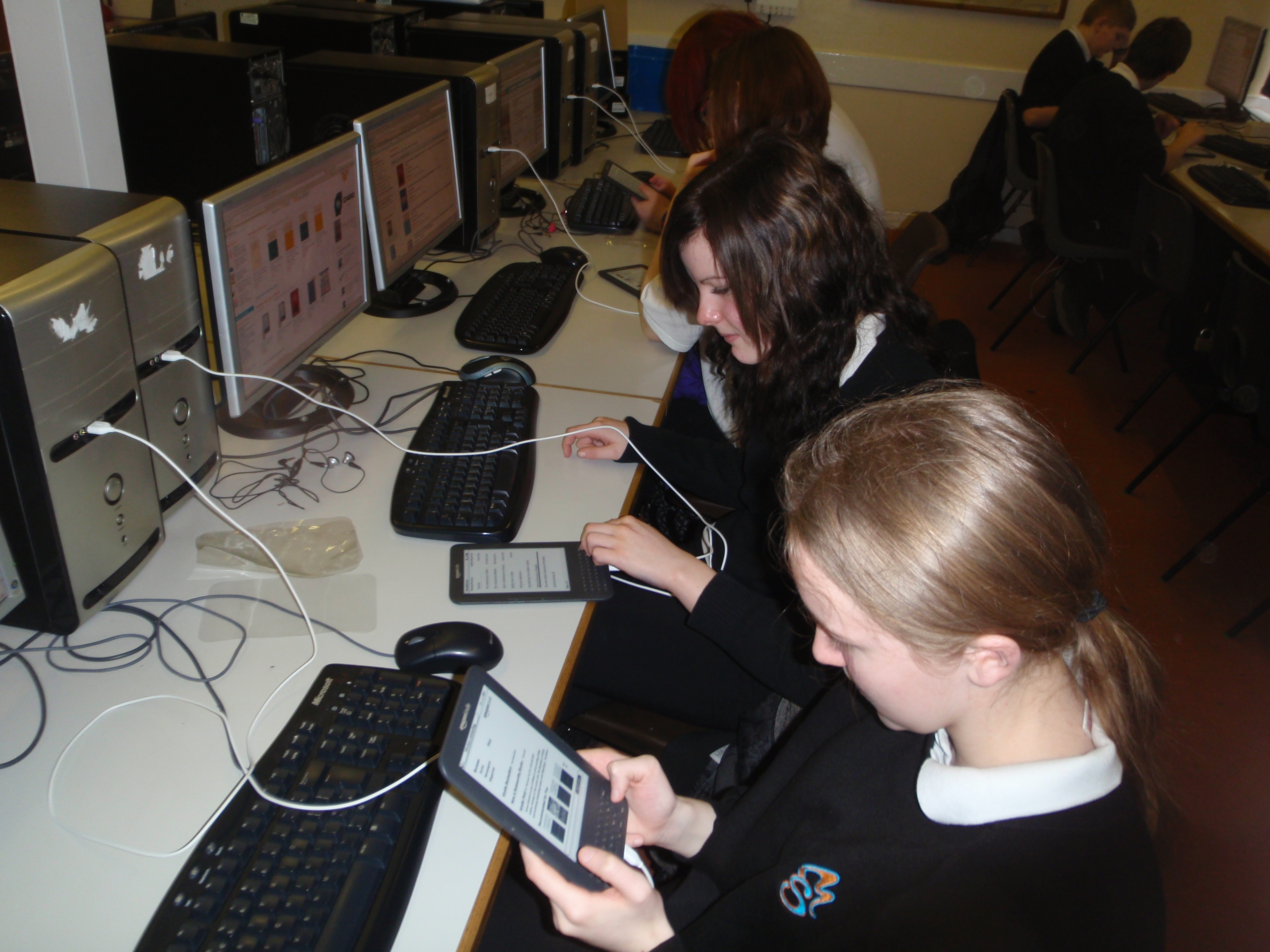
I finally got round to using these for the purpose I intended today: as a vehicle for giving worksheets to KS3. Year 9 are completing an assessment entitled, “Who was responsible for the death of JFK?” and they have been working with the conspiracy theories listed on Wikipedia as evidence for their response.

The Wikipedia entry on this is long, detailed and verbose. Even with all the unecessaries cut out, it numbers 27 pages. It also contains some quite complex language. I could have rewritten it, but since the students use Wikipedia as their go-to when it cmes to research homework I wanted to give them the raw material and teach them how to use it properly.

Initially I have created a PDF of the information. I transferred this to the Kindles from the computer. This saved me £12.60 in photocopying charges, and also meant the students were able to instantly look up the words they didn’t know, and search for the information they wanted.

As I suspected, initially the Kindles were a bit of a distraction but after 5 or 10 minutes they were using them for what I had intended. They took to the technology like ducks to water and were very positive. When I asked them at the end who would have preferred a paper version, not one of them put their hand up.

Here are some of their comments:

  • It’s very good because you can use the dictionary to look up words
  • It’s really easy to use
  • It’s too much information to remember so it’s nice to have it in front of you
  • It doesn’t take up much room
  • It’s not very heavy
  • It’s nice to have the dictionary and the information all in one place and note have to have lots of books lying around

Having got them out and charged them in the staffroom a couple of times now, interest is starting to build among other departments, especially English.

Posted in Kindle | 3 Comments

GCSE Success Criteria – Wallwisher (now GoogleDoc)

In January I wrote about putting succes criteria together for my year 10 class, as I taught them the Crime & Punishment unit. I have created a Wallwisher which I am editing to include all the criteria I have used so far.

My learning objectives are split into Knowledge and Skill, and so I always have a success criteria relating to Knowledge, which is always the same and is as follows:

A grade:
I have detailed historical knowledge.
C grade:
I have accurate historical knowledge.
F grade:
I have basic historical knowledge

This is then accompanied by criteria related to the skill involved in the lesson, and might be related to cause/consequence or change/continuity.

I’ll add more as and when I write them.

UPDATED:
Having had a week of problems trying to access Wallwisher I decided to put it all in a spreadsheet instead. You can access this GoogleDoc here.

Posted in Success Criteria | Leave a comment

My Favourite Homework

(Another draft I found that was waiting for pictures…)

I have started setting my year 8 classes the same homework every Christmas holiday. The task is to talk to their oldest surviving relatives to find out what they remember about history. Christmas is a good time for this HW because a lot of people see family members during the festivities.

The ideal is if the relatives can remember a specific historical event, or were involved in it. The back up task is for pupils to find out what school was like when their relatives were young. This feeds into our old GCSE History Around Us coursework, which was about the school in the 1950s, so there are back up lessons I can teach if the class are really enthusiastic about this particular topic.

This is the third year I’ve done this homework. Predictably, I hear a lot of stories about the second world war and evacuees. Something amazing always comes out of it, though.
The first year, I had a pupil whose distant relation had been on the Titanic as a staff member, and who had been bribed to row the life boat away half full. He had newspapers naming his relative, with details of the court proceedings that took place after the event. It was very exciting.

Last year, one of my pupils came back with a story about his Romanian dad, who had been a student during the 1989 revolution and who had stood on the steps of the university in Bucharest, handing out weapons. Romania was my particular acamedic interest at university so I found this utterly thrilling and spent quite a lot longer than my appointment time at year 8 parents’ evening quizzing this poor man about it. The positive with this particular kid is that he hadn’t had a great time in History up until that point, but developed a real interest for it afterwards.

This year, I was keenly anticipating what would come back, and I haven’t been disappointed.

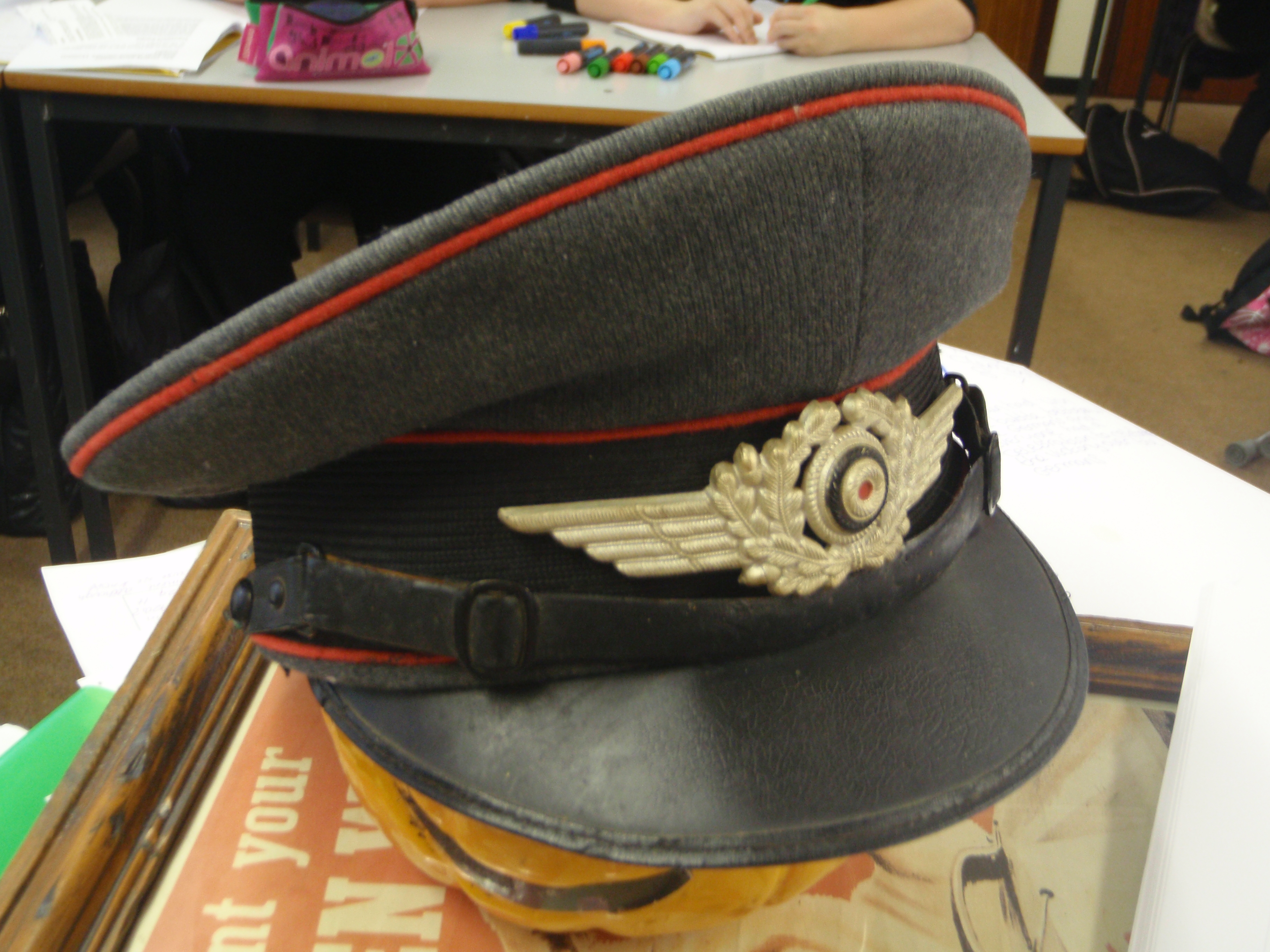
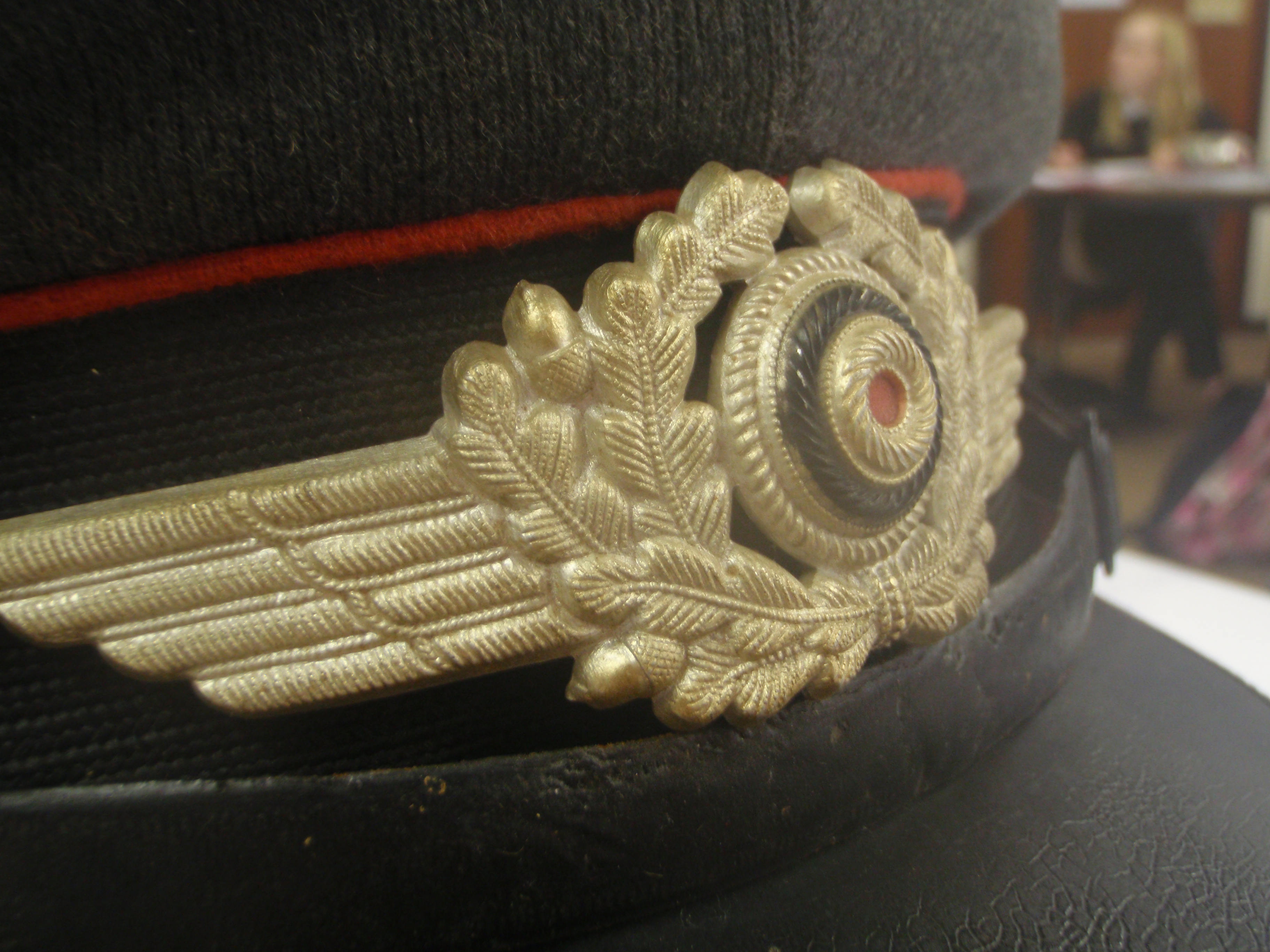
This turned up with a pupil yesterday. She said her great grandad found it on a beach some time after the end of WW2.

I spent considerable time Googling it and finding out what I could about it, in the end emailing this website to ask if they could help me to identify it. They have been extremely helpful and tell me it is a Luftwaffe flak cap; the red piping denotes artillery.

This has now given me an excellent homework for my year 9s, who will be allowed to view the hat, photograph it, make notes on it, and then will have to research it and write a story about how it got to the beach, as part of their study of WW2.

Amazing homework task! I can thoroughly recommend it.

Posted in HW | 1 Comment

Classroom Kindles: part 4

(With apologies to my year 11s – here is a post I wrote with them in March and never finished!)

Today I used my History lesson with year 11 to put the revision guide onto the Kindles and begin working with them.

I tweaked the revision guide in Word and then converted it to a Kindle ebook using Mobipocket Creator.

We don’t have any wireless access in the History mobiles, and because emailing the document to the Kindles via 3G would have cost 20p for each Kindle, I manually transferred the revision guide via my laptop. This took quite a long time; I will need to set aside a good half hour to transfer the second revision guide when I complete it.

Some learning points:
– The revision guide works with the text-to-speech function, so it will read to you. Jess K suggested that this could be used for subliminal learning, by listening to it reading to you whilst asleep.
– If, like us, you have checklists and bullet points in your ebook, make sure you put a full stop at the end of each one, or the text-to-speech reads through it without a pause.
– Lots of the students liked to turn the page landscape and found the revision guides easier to work with this way.
– Georgia found that typing takes quite a lot of time and you can only delete a character at a time, instead of holding down delete.
– Ashley discovered YouTube does not work on the experimental browser. I don’t think too many people were shocked by this revelation.

I have also, since this post was written, given the Kindles to my year 12s to use alongside an academic article, full of lengthy and confusing words. They made good use of the dictionary and were very complimentary. One of them, though, wondered who had downloaded a sample of the Kama Sutra onto one of the devices. I am also wondering that. Hard stares all round, year 11!

Posted in Kindle | Leave a comment

Classroom Kindles: part 3

Over the holidays I used my own Kindle to help me with the year 13 coursework drafts that have been steadily dribbling in.

I converted them to PDF and emailed them to my Kindle over my home WiFi, so I did not incur any charges. This meant that I could take them with me and annotate them during my travels in the Easter holidays.

When you annotate an item on your Kindle, it will give you a few options, including Save and Share. When I selected this option, I was invited to input my Twitter account details and then my note was tweeted out, directly from the Kindle. When I tweeted a comment about a book I downloaded from Amazon, the tweet contained a link to Amazon, and the link went to a page with both the comment and the excerpt from the book commented on. Obviously that doesn’t work for personal documents but if I arranged with students that they number their paragraphs I could get round that quite easily. A large number of my sixth formers seem to be on Twitter these days; marking would be quicker and more fun this way!

I got the school Kindles out today to charge and was delighted to find that most of them were still almost on full battery, which is marvellous considering it has been nearly two months since we charged them up. Obviously the Kindles where the 3G had been left on were dead, but I had envisaged a long hour in the staffroom, plugging them all in, so I was pleased to see this wasn’t necessary.

One of the ladies in my knitting group showed me her new Kindle today and she has already done a lot with it. As well as using it as a repository for the dozens of knitting patterns she has amassed over the years, she also has podcasts on it to listen to in the evenings while she’s knitting. I’m impressed! And this gives me even more ideas. We have revision podcasts….

Posted in Kindle | Leave a comment

More work with GoogleMaps

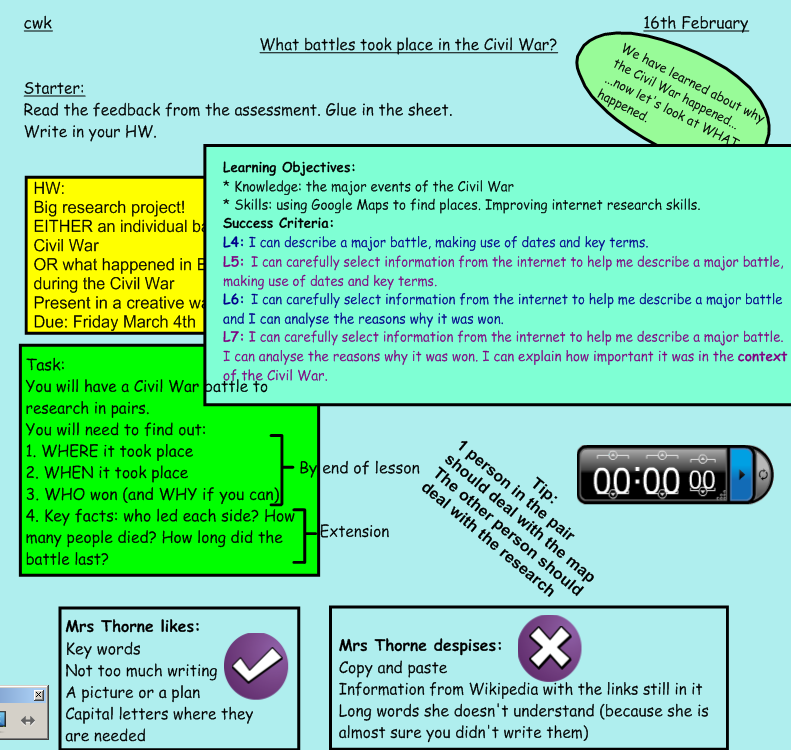
I managed to get a block of two lessons in the ICT rooms with two of my year 8 classes before half term, which enabled me to do further work with GoogleMaps. I set up a blank map and asked them to research the individual battles of the English Civil War. They needed to create a placemarker for each one of the battles.

Instructions for the taskThis somewhat cluttered slide is my attempt to tick all the boxes for the LA inspection we had before half term, but the pupils seemed to be able to work with it quite happily.

I was a bit uncertain how this project would work. Ideally students would have their own Google accounts and I would invite them to collaborate. This had two main issues, however – firstly, they don’t all have their own Google accounts and setting them up would have been time-consming; secondly I think they would also have had editing rights to the map from home, which I didn’t want.

Instead of this, then, I set up a generic school Google account and changed the password for the lesson, changing it to something else at the end. All the students collaborated on the map together via this same login. I was nervous that it wouldn’t work, and had a back up plan that they would email me the information for me to add, in case multiple logins were not accepted. However, it did work and the products were as follows:

8-4 – who had three lessons to work on their map

8-7 – who had two lessons.

As always, ratings and comments on the maps would be much appreciated.

Here are some student comments on the project:

  • I think it was really good. Firstly it helped us with our Geography, and secondly the lesson might have been really boring otherwise, like just copying from a book, but instead it improved our ICT skills and made the lesson more fun.
  • It was good because it wasn’t a complicated lesson but you still learned a lot about a certain battle.
  • I think it was really good and it helped us with our research homework (an individual battle of the Civil War).
  • I didn’t know you could use Google Maps for interesting things like that.
  • We learned the Wonderwheel function in Google search. We also learned how to Google for things more easily.
  • I think it might have worked well as a starter lesson for a unit, where we have to find out facts about it before we learn anything else.

Something new I learned: copying a placemark.
If I search for a place in Google Maps, it will drop a placemark to show me where this is. I can then choose to save this to any of my user-created maps and it will copy the placemark over, and I can then edit it to include facts about the Battle that took place there (or whatever).

Things to bear in mind:
Allowing students to log in to a generic Google account gives them access to a lot of things. When my colleague Jonty and I were discussing this project we tried to think of the possible negatives: they could change the password; they could send emails from the address. With these students I did not think this was a significant risk.
There is nothing to stop them deleting/moving each other’s placemarkers. I found this out the hard way.

There was a high level of pupil engagement throughout the task and it was, as always, very interesting to see that those who struggle with text books and writing were among the most adept when it came to internet searching. I was able to show them Wonderwheel and give them some tips on searching.

They all grasped the technical elements of creating the placemarkers immediately: actually, this was the easiest bit of the lesson. The hardest was helping them to find suitable information about each battle, rather than copying something they did not understand from a website aimed at a more academic audience. This wasn’t a surprise. After all, selecting appropriate information is a key element among the National Curriculum levels. If I had had a little more time, we would have looked at searching by reading age, under the Advanced Search tab on Google.

I found this to be a very successful exercise. I have been thinking for some minutes about how I would change it for next time but I don’t know that I would. This was the benefit of doing it with two classes, one of which was treated to a third session on it: I was able to edit the task for the second group. Other than spending a little more time thinking about how to search, there’s little I would change.

Next steps? I’d like to embed videos in the placemarkers. We’ve got an extra-curricular heritage project in the works which lends itself to this.

Posted in GoogleMaps | 1 Comment

Classroom Kindles: part 2

In the first instance I’m using the Kindles with my year 11 class. My year 11s being generally trustworthy, and also extremely flattered to be given the chance to try the Kindles first, I gave them two hours to play with little intervention from me, although I stayed logged into the Manage My Kindle page of Amazon so that I could keep an eye on what they were doing.

Several things became apparent very quickly.
Firstly, kids are far more inquisitive and quick to figure things out than I am.
Secondly, perhaps the 3G was not such a good idea after all: almost straight away, they were in the Kindle store, shopping for free books. I am grateful that there is no payment facility attached to the Amazon account, or I’m afraid we would have bought a lot of books.
Thirdly, I have never seen students as excited about reading before.

Here are some things my inquisitive year 11s were able to discover:
– you can get onto Facebook but it’s really slow
– you can read and you can listen
– you can choose the voice for narration, either male or female
– you can change the speed at which it reads to you
– there are lots of free books available
– it’s easier to read than a computer screen
– you can change the name of the device from the device (and also, I now understand, the email address; though thankfully none of them tried that).

Last week Tim Dalton wrote an excellent post on using Kindles in a school library, which confirmed some other things that I had gleaned from our trial session: namely, that you can distribute a book to only six devices per Amazon account. This appears to apply to even free books, as I tried to send the Communist Manifesto to all the Kindles but it did not work.

I think the way we’re going to get round this is to set up five Amazon accounts and have six Kindles registered to each one. When it comes to paying for books (something I have not yet really thought about, since I will initially be writing my own Kindle editions of our revision guides), I’d be happy to pay for the books several times over but this facility does not appear to be available, though perhaps I just need to look a bit more carefully.

Posted in Kindle | 6 Comments

Don’t ask me for a pen

In my first year as a teacher, a colleague from another school told me she’d been to an inset where the presenter had suggested we help kids too much. He suggested we don’t hand their books out for them, as a way of making them a bit more independent. (I’m sure there was more to it than that, but it was a long time ago!)

This struck a chord with me and as a result, I have tried to follow this through in my own classroom. Books live in a box in the cupboard. If a child is sat with no book in front of them, that is going to get them a raised eyebrow and hard stare from me until they rectify it.

The biggest battle, though, has been with pens. I have given away hundreds of pens. When I ran out, my husband gave me his BECTA stash – easily a hundred pens – which I placed in a container in the corner of the room, and though I never offered a pen to anyone, and nobody ever asked me if they could borrow one, those pens were all gone within the space of four months. I am immensely frustrated by this. Pens cost a mere 4p from the Reprographics department. I see more than 4p in coppers on the ground between my classroom and the main block most days. There is NO EXCUSE.

So, I started to announce to classes at the start of each year, that I do not lend pens. Ever. If students ask me for a pen, they get a negative behaviour mark for not being equipped. PE give these marks for not bringing kit, so I give it for not bringing the equipment needed for my lesson. Students can ask each other for pens, or I will let them go and buy a pen in exchange for a detention to make up the lesson time they miss.

It’s draconian, but it works. The classes I’ve had for two years now automatically ask each other. I know, when they ask me, it’s due to a pen’s untimely demise and not just an expectation of provision.

I like to think my little stand over pens does something to foster some independence in these kids, but I don’t fool myself. I told my year 8 class, who I have seen through from year 7, that I was pleased with them for asking each other, and they told me they only do it in my lesson. Everywhere else, they get given pens. I think I should work out how much money school spends every year on pens, and then see if more teachers would be willing to take my route.

This did, unfortunately, cause an awkward moment last term when the deputy head was doing a drop-in and a student asked me for a pen, and I had to refuse. She leant him hers and was unable to complete her observation form. I don’t think it went down very well.

I came across Dan Meyer’s Less Helpful blog this week, which I hope is going to give me more tips along these lines. After an evening explaining to parents of sixth formers that I can’t give their sons and daughters writing frames that will help them pass their A-levels, I am more than ever convinced this spoon feeding has got to stop.

Posted in lesshelpful | Leave a comment